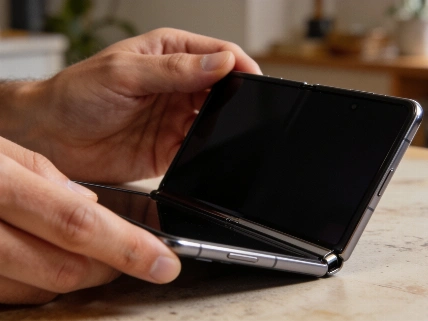
iPhone Duo Reviews Report Heat During FaceTime and Demanding Tasks
Reviewers reported heat during FaceTime and demanding graphics tasks, with camera use also cited. Setup activity or charging may add to the load, as can weak reception, so checking Battery activity and testing one task at a time can help narrow the cause.
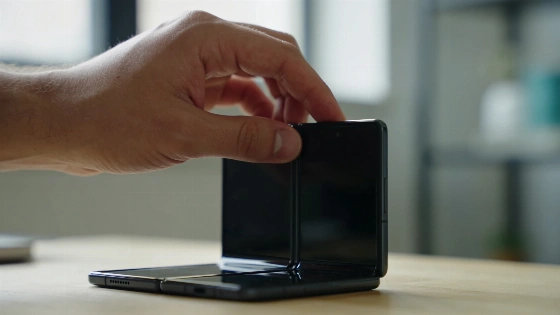
MediaStorm measured a peak of around 49 °C (120 °F) in its thermal tests, with the unfolded phone about 2 °C (3.6 °F) warmer than when closed. Those figures came from its testing, not from a FaceTime call. MediaStorm also found a large temperature difference between the two halves, with the basic chip concentrated on one side. Its CPU benchmark results were similar to the iPhone 18 Pro, while demanding GPU workloads performed less well and generated more heat.
That distinction matters. The measurements describe one reviewer's test conditions; they do not establish a universal temperature or show that unfolding the device always cools it. Early reviews published October 21-23, 2026, described differing experiences rather than a consistent finding across every device.
What reviewers observed
MacRumors reported that Wall Street Journal columnist Joanna Stern ended a FaceTime call because her iPhone Duo had become too hot to hold comfortably. Stern also reported warmth during photography. She described the phone getting really warm, while Apple characterized the warmth as part of its thermal design, saying heat is moved away from the chip to help maintain performance. Reviewers differed on how severe the heat felt, as MacRumors reported. That account does not confirm an automatic thermal shutdown or prove that FaceTime causes a fault on every device.
A long call keeps the camera, video processing, display and network connection working together. Charging or a weak mobile-data connection may add to the heat, though the cause of any particular warm call needs to be checked. The reported FaceTime experience was one reviewer's use case among several demanding tasks noted in early reviews.
The Verge also reported heat during third-party video apps and Google apps. Extended camera use with Duo Preview or Kid Cue made the phone warmer while the camera and both displays were in use. Adding Smart Take, a processor-intensive camera feature that automatically activates the shutter, could make the phone hot enough to cause noticeable lag after extended use. The Verge described the Duo as a thin phone driving two large displays and reported that it "definitely gets warm, and sometimes hot," in its review of the device.
MediaStorm said its launch demonstration unit ran hot and that its thermal behaviour improved after a software update. The update observation concerned that demonstration unit; MediaStorm's CPU benchmark results were similar to the iPhone 18 Pro, while demanding GPU work performed less well and produced more heat. The reviewer also found a large temperature difference between the two halves, with the chip concentrated on one side.
Setup and apps can add background work
A new phone may still be downloading, syncing with the cloud or indexing data after the home screen appears. Apple lists initial setup and restoring a device among normal reasons an iPhone can warm up. A FaceTime call or game can add foreground activity while those tasks continue.
Apple says Messages may keep indexing after a software update or data transfer, sometimes for up to a few days depending on the stored data and other background work. Check Settings > Battery for ongoing device setup or iOS update activity when those indicators appear. Let the process finish on reliable Wi-Fi, with the screen locked when practical.
An app's layout and its energy use are separate questions. Black bars, oversized controls or stretched designs show that its interface may need work; they do not reveal its processing load. MediaStorm found uneven app adaptation, while The Verge reported heat in particular workloads, including camera features using both displays. Neither review established a specific software defect as the cause.
Update an app that repeatedly warms the phone, then compare it with another app doing a similar task under similar conditions. If one app stands out, note its version, what you were doing and its Battery activity before contacting the developer.
How to narrow down the cause
First let the phone cool if it becomes uncomfortable. If a temperature warning appears, turn it off. End a call and disconnect charging if the device gets uncomfortably warm.
Then change one condition at a time. Record the app and task, charging state, connection, room conditions and whether the phone was folded. Check Settings > Battery, and see whether setup, a restore or syncing is still active before judging ordinary use.
For a FaceTime retest, start with a cool phone on strong Wi-Fi, unplugged and without another demanding app running. Stop if it becomes uncomfortable again. Update iOS and the app if stable updates are available; contact Apple if large heat continues during light use or while idle after setup has finished, or if warnings and interruptions recur.
Temperature problems can also take the opposite form: NerdsMagazine's cold-weather report covered shutdowns in freezing conditions, a different issue from the heat described in these reviews.
For Apple's guidance on temperature warnings, paused charging and cooling, consult "Si tu iPhone o iPad se calienta o se enfría demasiado".
Topics: