iOS 27.2 brings conversation-aware Siri and iPhone Duo Pencil support
Siri can draw on earlier chats and more personal data while iPhone Duo gains Apple Pencil support. The update also changes several apps and fixes vulnerabilities across iOS components.
Some of the flaws fixed in iOS 27.2 could expose data or allow arbitrary code execution when an iPhone processed specially crafted web content. The update also brings changes to Siri, iPhone Duo and several built-in apps. Apple dates iOS 27.2 to October 26, 2026, and describes the release as including additional features, bug fixes and security updates. Its iOS 27.2 update notes describe Siri's ability to retain useful context from earlier interactions and draw on a wider range of personal context.
The biggest Siri change is continuity between conversations. Ask about a restaurant Siri recommended a few days earlier and the assistant can recall the exchange without requiring the context again. Apple describes Siri's personal-context features as drawing on information such as messages, emails and photos, alongside onscreen awareness.
Siri uses more context with limits
Siri can draw on information such as photos from Messages, Calendar event attendees, voicemail, Safari history and the Reading List. A new "Excluded Apps" section in Settings lets users prevent Siri, system search and recommendations from using data from selected apps. Users can also copy only the related to the topic portion of a Siri response. Apple says Apple Intelligence uses on-device processing and Private Cloud Compute; data handled through Private Cloud Compute is not stored or made accessible to Apple or others. Some server-side Apple Intelligence features, including Siri AI, are subject to daily usage limits.
The feature works on all iPhone 16 models and later, along with iPhone 15 Pro and iPhone 15 Pro Max. iOS 27.2 adds French, Japanese, Korean, Portuguese and Spanish. Apple describes Siri AI as a beta feature that requires an Apple Intelligence-enabled device and a supported language; some Apple Intelligence features are not available in every region or language. Siri AI remains unavailable in the European Union and mainland China.
The release follows an earlier iOS 27 rollout in which some Messages suggestions and AI Password Repair were postponed, as covered in NerdsMagazine's earlier iOS coverage.
New hardware and app features
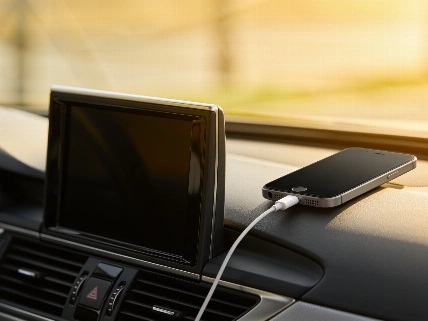
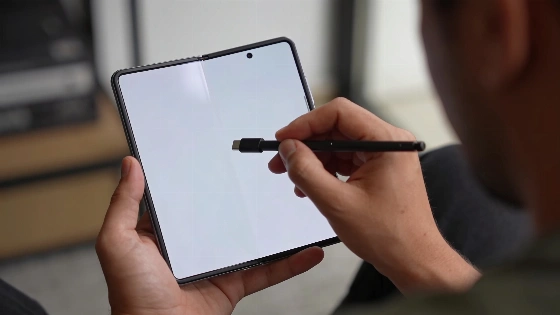
iPhone Duo supports Apple Pencil (USB-C), which connects to and charges from the phone through a USB-C cable. Other Apple Pencil models are incompatible. Apple Support specifies that Apple Pencil (USB-C) is the only compatible model and requires iOS 27.2 or later. The stylus works on both displays for note-taking and drawing, and can mark up documents.
During video calls, the new Edge Light feature illuminates the edges of iPhone Duo's inner display to light the user's face. Brightness and color temperature are adjustable, and Edge Light can activate automatically in low light.
Messages can suggest creating a Calendar event or reminder from a conversation. Apple says Messages Suggestions use conversation context to offer quick actions in Calendar and Reminders. It can also open a location in Maps or show flight and delivery details. Users choose which suggestion types to receive in Settings; the feature works only in English at release.
In Photos, users can edit shared-album captions and comments. The app warns when a photo is already in an album and can remind users to save pictures before an album expires. iOS 27.2 also supports invisible SynthID markings on images made or substantially edited with generative AI. Image Playground applies the marking, as do some editing operations in Photos; it is embedded in the file rather than shown as a visible watermark.
Apple Music gets a monochrome icon, a blue point out for the active tab and black widget backgrounds. Apple announced no changes to recommendation algorithms or audio playback quality in this update.
Podcasts now separates new and in-progress episodes into New Episodes and Continue Playing, replacing Up Next. Apple TV adds separate profiles with individual watch histories and recommendations; child profiles have parental controls. On iPhone, Multiview supports up to four live sports streams at once, subject to country, event and subscription availability. Apple Games profiles now show recently played games and additional recommendation details.
Calls, home controls and security
FaceTime group calls now support Dual Capture on compatible iPhones, so the front and rear cameras can stream simultaneously. A call can also include a third-party sign language interpreter or real-time captioning specialist.
Home adds Lock After Closing and Door Left Open settings for compatible smart locks. They can lock a door after it closes or notify users if it remains open, with notification delays of 5, 10, 15 or 30 minutes. HomePod 27.2 adds Lock Controls to disable ordinary taps on the top panel and prevent accidental playback or volume changes.
Shortcuts can run an automation when iPhone Duo opens or closes, with actions triggered by its position. Apple's iOS 27 documentation lists the opening or closing of iPhone Duo as an automation trigger. Apple has also expanded automations for workouts and apps. Shortcut names and icons can now be changed from the library.
The security fixes cover Apple Intelligence, Siri, WebKit, Bluetooth, Calendar and Contacts, as well as image and audio processing components, the system kernel and other modules. Some vulnerabilities could have caused memory corruption, data disclosure or arbitrary code execution when specially crafted web content was processed. Apple's security bulletin for iOS 27.2 and iPadOS 27.2 also identifies Siri-related vulnerability CVE-2026-112658, which could allow an app to access sensitive user data. Apple says it addressed that issue with improved input validation and credits security researcher Mickey Jin, known as @patch1t. Details appear in Apple's iOS 27.2 security bulletin.
To install the update, open Settings > General > Software Update on an iPhone compatible with iOS 27.
Topics: