iPhone Duo's Fixed Split Trades Window Control for Consistent App Shapes
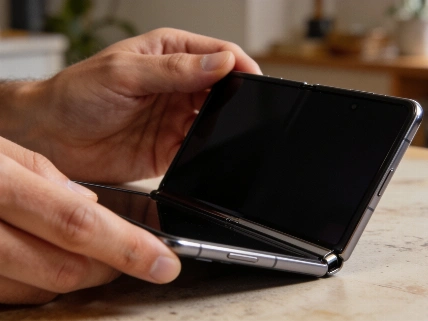
The 5.4-inch outer display and 7.6-inch inner display share a shape that helps explain iPhone Duo's equal split. The arrangement makes app spaces predictable, but users cannot give one window more room.
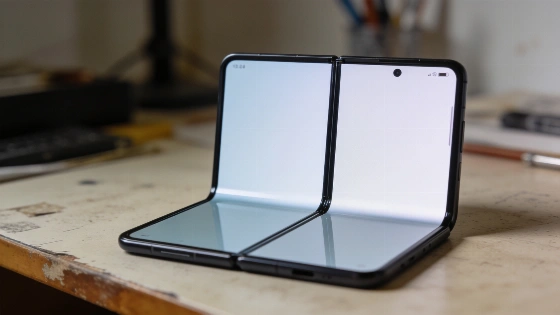
Both the 5.4-inch outer display and 7.6-inch inner display use approximately √2:1 proportions when measured by their long and short edges. That relationship helps explain why iPhone Duo's launch experience gives two side-by-side apps equal space. Apple says the two displays share the same aspect ratio, so apps can scale proportionally between the closed and unfolded states. The divider cannot be dragged into a one-third/two-thirds layout.
For people comparing two apps, the arrangement can be convenient. Put a document beside a narrow chat window, though, and the same fixed allocation may waste room. The design choice is a usability trade-off, not evidence that unequal splits are technically impossible. WIRED reports that Android devices have offered split-screen and resizable-window behavior for years, while the Duo's standard two-app sector split stays at 50-50.
How the screen proportions shape the layout
Zhong Wenze's review describes the two halves of the inner display as familiar compact canvases. Their shape matches the outer display after rotation, even though the full inner display is wider than it is tall when used side by side.
The geometry is similar to A-series paper: divide an A4-shaped rectangle equally along its long dimension and each half retains the original long-to-short ratio. In an ideal inner rectangle measuring √2 units wide by one unit high, each half is 1/√2 units wide by one unit high. Its long edge divided by its short edge is √2. This illustrates the relationship rather than exact panel dimensions; it leaves out the rounded corners and other display areas, including the divider.
Zhong counts the outer display and the full inner display as useful screen regions, then treats its two halves as separate regions too. There are still two physical display panels. His interpretation is that the repeated shape helps explain the name Duo and gives the device several ways to pair its screens.
Apple's developer announcement also links matching display ratios to proportional scaling and smoother transitions between the outer and inner displays. The company says standard SwiftUI and UIKit components can adapt across the displays, including by expanding into multiple columns and moving controls away from the fold when the device is partially closed. The review connects the opening animation with the Dock staying on the right, helping the two device states feel spatially related. That continuity does not mean an app transfers pixel for pixel: moving to the full inner display gives it a larger destination, and its orientation or interface may change.
Using the rounded 5.4-inch and 7.6-inch diagonals, the full displays differ by about 1.41 times in linear size and roughly twice in area. The handoff can feel consistent, but keeping an article's position or a video's playback state still depends on the app. Apple's developer announcement describes the proportional scaling and adaptive layouts intended for the two screens.
What equal halves allow and restrict
Two apps get matching space, which can suit comparing shopping pages or viewing a map beside a message. Zhong also demonstrates dragging a photo into a conversation between supported apps. The basic fold aligns with the divider, while both app areas keep a familiar shape. The Duo's Split View is the first system-level side-by-side multitasking feature on an iPhone, and reviews describe the standard arrangement as limited to two apps.
That consistency comes at a cost. A spreadsheet may benefit from more width than a reference note, and a document may need most of the display while a chat occupies a narrow strip. The launch layout gives users no system-level way to make that adjustment. WIRED reports that two apps cannot be stacked vertically in portrait orientation; its review notes that portrait split-screen is available only with a video app.
The proportions explain the appeal of equal halves without making other splits impossible. In the idealized √2:1 example, a two-thirds/one-third division would create panels with long-to-short ratios of about 1.06:1 and 2.12:1. Those shapes would require different layout handling. Apple could support that flexibility in software; the demonstrated launch behavior instead prioritizes a smaller set of predictable arrangements.
The same paired-screen idea appears in other interactions in Zhong's review. Camera previews use the outer display alongside the full inner display so people on opposite sides can see the shot. His Duo FaceTime example places a remote caller on the outer display and one inner half. A partly folded device can also separate content from controls across its two inner regions. HardwareZone also describes a partially folded video mode that places playback controls on one half and video on the other.
His Xiaohongshu demonstration shows how an app can adapt its own content, with a picture becoming immersive or a video appearing beside comments. That is different from resizing the system divider between two apps. Developers still need to plan navigation and folding transitions carefully; keyboard behavior needs attention too. Apple says standard interface components can adapt automatically, with controls repositioned around the fold and some interfaces expanding into multiple columns.
The software limitation also sits alongside the device conditions covered in NerdsMagazine's Duo temperature report, which noted a published operating range beginning at 0°C. The two stories concern separate practical constraints.
An app update can improve how that app uses its allotted area. Changing the fixed split itself would require Apple to change the multitasking behavior; Zhong's review offers no basis for promising that an app update will do so.
Topics: