IconSwapper Puts Live AI Usage Into Mac App Icons
The app can show usage and reset limits for supported AI services through their icons. Other effects make familiar Mac apps respond to activity or a moving pointer.
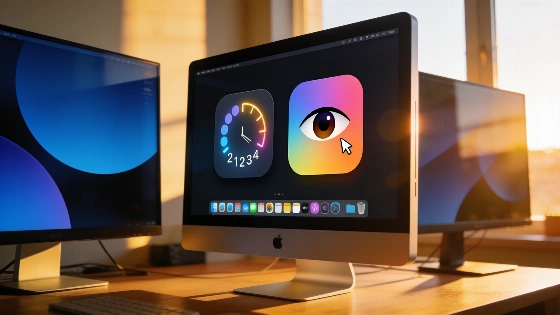
Finder's character can follow the pointer; Safari's compass responds to page loads and downloads. These playful effects show how IconSwapper makes app icons react to activity on a Mac. Copenhagen-based designer Michael Flarup launched the macOS utility on November 17, 2026, describing it as an "icon studio for your Dock."
Designed by Flarup, the utility can also turn icons for AI apps into live displays. Users can set one up for ChatGPT or Claude; Cursor is supported too. The icons can show usage progression and reset countdowns. They also animate while an assistant processes a request, as Flarup described in his launch announcement.
Live overlays and custom designs
IconSwapper offers conventional icon changes alongside its live effects. Users can adjust an icon with built-in controls or choose from a library of alternatives. They can also upload their own artwork. Live icons can appear in the tab bar while switching apps, offering another way to see them when the Dock is crowded. The product layers live data over custom artwork, which can move rather than remain a static replacement image.
Flarup is based in Copenhagen and runs a design studio. He has made Mac icons since the early 2000s and wrote The App Icon Books, a book celebrating icon designers. Customizing system icons proved difficult because macOS does not officially support theming and protects its system icons. Flarup developed a way to draw over them instead. IconSwapper is sold by Flarup Industries, and a non-subscription license can activate the app on up to three Macs.
"The breakthrough was figuring out how to send the Dock a bitmap for another running app and have it draw that frame itself," Flarup told TechCrunch. He said the artwork follows icons as macOS moves them, including during Dock magnification and in the Command-Tab switcher. The renderer uses custom Metal shaders to draw the artwork in real time, layering it over icons already displayed in the Dock.
That approach supports effects such as animation while an app is thinking or light moving across an icon as the pointer passes over it. Examples include Finder and Safari, with Spotify also featured. Mail and Chrome appear as well. Their icons respond to cursor movement or downloads, while other effects track page loads and music activity. They can also react to other application events. For readers interested in desktop personalization, NerdsMagazine has also covered a preserved lunar desktop image.
IconSwapper launched with a listed one-time promotional price of $19, scheduled to rise to $29 afterward. The product listing describes the license as non-subscription and says it covers up to three Macs.